
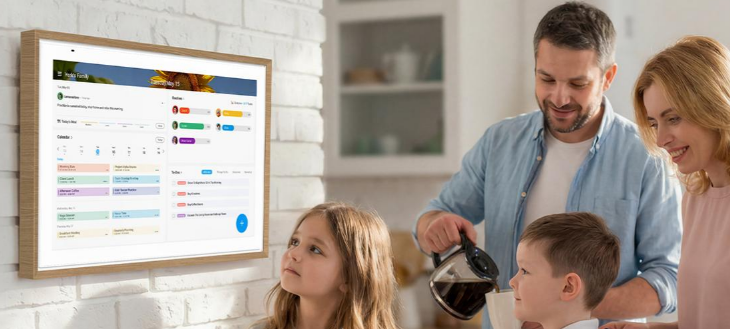
Keeping a household organized can feel like a full-time job. Between work meetings, school drop-offs, extracurricular activities, grocery shopping, cleaning, meal preparation, and family time, even a simple week can become overwhelming.
The problem is rarely that families do not care about being organized. More often, important information is scattered across phone calendars, paper notes, messaging apps, school newsletters, and individual to-do lists. Parents may forget appointments, children may struggle to follow daily routines, and household chores can become a constant source of reminders and frustration.
Fortunately, you do not need to completely change your lifestyle to create a more organized home. A few practical systems can make a significant difference.
This guide explains how to organize family schedule information, improve family schedule management, establish a kids daily routine planner, simplify household responsibilities, and make better use of your living space. You will also discover practical entertainment and photo-display ideas that can help create a more connected family environment.
Whether you prefer a simple paper planner, a shared smartphone calendar, or a dedicated smart display, the goal is the same: make everyday life easier for everyone.

Why Is It So Difficult to Keep a Family Organized?
Before choosing a solution, it helps to understand the common problems that make household organization difficult.
– Information is spread across too many places
One parent may keep appointments in Google Calendar, another may use Apple Calendar, while the children receive printed school schedules. Important information can easily get lost when nobody has a clear view of the family’s commitments.
– Children need frequent reminders
Children often need help remembering when to get dressed, pack their school bags, complete homework, tidy their rooms, and prepare for bedtime. Repeating the same instructions every day can become exhausting for parents.
– Household chores feel unevenly distributed
Without clear responsibilities, one person may end up handling most of the cleaning, shopping, laundry, and meal preparation. Other family members may not know what needs to be done or when.
– Living spaces have to serve multiple purposes
A small living room might function as a place to relax, entertain guests, help children with homework, and watch television. Without a flexible arrangement, the room can quickly become cluttered.
– Family memories remain trapped on phones
Families take hundreds of photos throughout the year, but many remain buried in camera rolls and messaging apps. Sharing these memories with grandparents or displaying them at home requires a more convenient approach.
The solution is not necessarily buying more products. It is creating a system that addresses these problems while fitting your family’s routines, budget, and available space.
How to Organize Family Schedule Information Without Feeling Overwhelmed

The first step in learning how to organize family schedule information is to establish one reliable place where everyone can see upcoming commitments.
– Step 1: Gather all existing schedules
Start by collecting the information your family already uses, including:
-
Work meetings and business trips.
-
School activities and extracurricular classes.
-
Medical appointments and important deadlines.
-
Birthday parties and family events.
-
Household chores and grocery shopping.
-
Meal plans and recurring weekly responsibilities.
Do not worry about organizing everything perfectly at first. The objective is to understand what needs to be managed.
– Step 2: Choose one central calendar
There are several ways to create a shared family calendar.
A paper calendar is inexpensive, easy to understand, and does not require electricity or internet access. However, it can be inconvenient when schedules change frequently or family members need access while away from home.
A shared digital calendar allows family members to view and update appointments through their phones or computers. It can be particularly useful for households where parents work different schedules.
A dedicated digital calendar display takes this concept further by putting the family’s schedule in a visible location, such as the kitchen or hallway. Rather than opening an app, family members can check upcoming events as they walk past the screen.
The best choice depends on how often your schedule changes and whether your family benefits from having a shared visual reminder.
– Step 3: Use colors to identify responsibilities
Assign a different color to each family member or activity category.
For example:
-
Blue for one parent’s work commitments.
-
Purple for the other parent’s appointments.
-
Green for children’s school activities.
-
Orange for household responsibilities.
-
Red for deadlines that require special attention.
Color coding makes it easier to identify schedule conflicts without reading every event individually.
– Step 4: Schedule a weekly family review
Choose a consistent time, such as Sunday evening, to review the upcoming week.
Check appointments, confirm transportation arrangements, identify busy days, and decide when meals or household tasks should be completed.
A 10–15-minute review can help prevent last-minute confusion. Encourage everyone to contribute rather than making one person responsible for the entire system.
– Step 5: Keep the calendar realistic
Avoid scheduling every minute of the day. Families need flexibility for unexpected delays, rest, and spontaneous activities.
Leave buffer time between appointments and avoid assigning too many chores to children on days when they already have demanding school schedules.
The goal of family schedule management is not to eliminate every inconvenience. It is to make important commitments visible and manageable.
Family Schedule Management: Which Tools Actually Help?
Choosing the right tool can make a shared schedule easier to maintain. However, a sophisticated system is not always better than a simple one.
| Organization tool | Main advantage | Potential limitation |
|---|---|---|
| Paper wall calendar | Affordable and simple | Manual updates and limited remote access |
| Smartphone calendar | Convenient and portable | Information can remain hidden on individual devices |
| Shared calendar app | Multiple people can coordinate | Requires everyone to check or update the app |
| Whiteboard command center | Flexible for notes and reminders | Information must be updated manually |
| Digital calendar display | Makes schedules visible in a shared space | Higher upfront cost and requires power |
| Dedicated family organizer display | Can combine calendars, tasks, and other widgets | Features and compatibility vary by model |
A dedicated display may be especially useful when family members frequently miss notifications or do not regularly open their calendar apps.
One option worth evaluating is the ApoloSign 21.5-inch Digital Calendar. Its official product page lists calendar synchronization with Apple, Google, Outlook, and other supported services, alongside chores, rewards, meal planning, shopping lists, and customizable dashboard widgets. The listed price at the time of research was $379, although you should check the current price before purchasing.

A practical option for a shared family calendar
The ApoloSign 21.5-inch model may suit households that want a larger shared screen without moving up to a 27-inch display.
It is worth considering if your family wants to see schedules, household tasks, and meal plans in one place rather than relying exclusively on individual phones.
Check current features, compatibility, and pricing before ordering.
A digital calendar is not essential for every household. If your current shared calendar works well, there may be no reason to replace it. Consider an upgrade when visibility, coordination, or repeated reminders have become persistent problems.
Family Chore Management: How to Share Household Responsibilities Fairly

Effective family chore management starts with clear expectations. Instead of asking everyone to help whenever something needs doing, assign specific tasks with realistic deadlines.
– Create a simple household chore list
Divide chores into categories based on frequency.
Daily tasks
-
Make beds and put away personal belongings.
-
Clear the dining table after meals.
-
Wash dishes or load the dishwasher.
-
Pack school bags for the next day.
-
Spend a few minutes tidying shared spaces.
Weekly tasks
-
Vacuum or sweep floors.
-
Change bed sheets.
-
Clean bathrooms.
-
Organize groceries and plan meals.
-
Review household supplies and shopping needs.
Occasional tasks
-
Declutter cupboards.
-
Organize toys and seasonal clothing.
-
Clean windows.
-
Prepare guest rooms.
-
Review items that need repair or replacement.
Assign each task to a specific person and agree on what completing it means. For example, “clean the kitchen” is vague, while “wipe the counters and put away clean dishes after dinner” is easier to understand.
– Match chores to age and ability
Younger children can put toys away, place clothes in laundry baskets, or help sort clean items. Older children can prepare simple meals, manage their school supplies, or take responsibility for more complex cleaning tasks.
Avoid comparing siblings or expecting everyone to perform identical tasks. Fairness means sharing responsibilities in a way that reflects each person’s abilities and circumstances.
– Make progress visible
A checklist can help children understand what they need to do without repeatedly asking a parent for instructions.
Some families use stickers or a reward system to encourage consistency. Others find that predictable routines and positive feedback work better than material rewards.
The important thing is to recognize effort and avoid turning every household contribution into a negotiation.
A shared digital display can make these responsibilities easier to see. For example, the ApoloSign Digital Calendar includes routines, chores, and reward-related features according to its product information. Families who prefer a screen-based approach can explore whether these functions fit their needs.
See how the ApoloSign family calendar works
Kids Daily Routine Planner: Helping Children Build Better Habits

A useful kids daily routine planner helps children understand what happens next. It reduces uncertainty and gives them opportunities to become more independent.
– Build a morning routine
A simple morning checklist might include:
-
Get out of bed.
-
Use the bathroom and brush teeth.
-
Get dressed.
-
Eat breakfast.
-
Pack school supplies.
-
Check the day’s schedule.
-
Leave home at the agreed time.
Keep the sequence consistent whenever possible. If a child struggles with several steps at once, start with three or four essential tasks and gradually introduce more.
– Create an after-school routine
After school, children may benefit from a predictable transition between learning and relaxation.
A practical routine could include changing clothes, having a snack, reviewing homework, enjoying free time, and preparing for the following day.
The order should reflect your child’s needs. Some children prefer to complete homework immediately, while others need a short break first.
– Make bedtime easier
A consistent bedtime routine can include preparing clothes for tomorrow, putting away toys, brushing teeth, reading, and turning off screens at an agreed time.
Visual reminders are often more useful than lengthy verbal instructions. Younger children may respond well to pictures, while older children may prefer a written checklist or digital task list.
– Choose a planner that grows with your child
A printed chart is a good starting point because it is inexpensive and easy to customize. A magnetic board can work well for reusable daily tasks.
For families managing multiple children’s routines, a shared digital organizer may offer a more centralized overview. Some digital calendar systems also allow tasks and routines to be displayed alongside family events.
However, the display should support the routine, not become another source of distraction. Keep instructions simple and give children age-appropriate responsibility for checking their own tasks.
Small Living Room Ideas: Make Limited Space Work Harder

When space is limited, the same room often needs to support relaxation, work, children’s activities, and entertainment. The most effective small living room ideas focus on flexibility, storage, and keeping unnecessary items out of the way.
– Use furniture with more than one purpose
Consider storage ottomans, nesting tables, foldable desks, or sofas with built-in storage. These pieces can reduce clutter without sacrificing useful functions.
Before buying furniture, measure the room and consider how people move through it. A smaller piece that preserves a clear walkway may be more practical than a larger item with additional features.
– Take advantage of vertical space
Wall shelves, hooks, cabinets, and mounted organizers can free up floor space.
A wall-mounted digital calendar is another option for households that want a shared schedule without adding a desk or countertop organizer. Make sure the mounting location is safe, accessible, and suitable for the display.
– Create separate activity zones
Even in a small room, visual boundaries can help define different uses.
A rug can distinguish the seating area from a children’s play space. A compact shelf can separate work materials from entertainment equipment. Storage baskets can keep toys accessible while making cleanup easier.
– Reduce visual clutter
Choose a consistent color palette, store small items in containers, and keep frequently used surfaces relatively clear.
Avoid adding a screen simply because it looks attractive. Consider whether it solves a real problem, such as displaying the family schedule, replacing several separate devices, or providing entertainment in a flexible location.
A carefully planned room can feel more spacious without requiring a renovation.
Portable TV for Home: Is a Movable Screen Worth It?

A portable TV for home can be useful when you want to watch entertainment in different rooms without installing a separate television in each location.
For example, a movable screen could be used in the living room during the day, in a bedroom in the evening, or in a home office for video calls and presentations.
– What should you look for?
Consider these factors before choosing a portable screen:
-
Screen size: Make sure it suits the viewing distance and available space.
-
Mobility: Check wheel quality, stand stability, height adjustment, and ease of movement.
-
Power: Some models include a battery, while others need to remain plugged in.
-
Connectivity: Confirm Wi-Fi, Bluetooth, HDMI, and streaming-app compatibility.
-
Sound and camera: Built-in speakers, a microphone, or a camera may be useful for calls.
-
Storage and software: Check available apps, operating system support, and software updates.
-
Price: Compare the cost with a conventional television, tablet, or monitor.
– An option for flexible home entertainment

ApoloSign 24-inch Smart Portable TV
ApoloSign’s product page lists a 24-inch Full HD touchscreen, a wheeled adjustable stand, Android 16 with Google Play access, built-in speakers, a camera and microphone, and a battery for portable use.
The listed price at the time of research was $619. This is a premium option, so compare it carefully with a conventional TV or tablet before deciding whether the additional mobility and touchscreen functions justify the cost.
This type of screen may suit households that frequently change their viewing location or want a single device for entertainment and selected productivity tasks.
On the other hand, a conventional television may be more economical if you only watch content in one room. Always check the actual battery specifications and streaming-service compatibility for your region before purchasing.
Portable TV for Camping: What to Consider Before Taking One Outdoors

A portable TV for camping can add entertainment to a road trip, caravan holiday, or campsite with suitable power and connectivity. However, not every product described as portable is designed for use far away from a power outlet or internet connection.
– Check battery life and charging options
If you plan to watch movies away from an electrical hookup, battery capacity becomes important.
Review the manufacturer’s stated runtime, charging time, and whether the device supports a compatible power station. Real-world battery life can vary depending on brightness, volume, applications, and other settings.
– Understand your internet requirements
Many smart TVs rely on Wi-Fi for streaming. Camping locations may have weak or unavailable internet, so investigate whether your chosen services allow offline downloads or whether you can create a reliable mobile hotspot.
Check mobile data costs and signal coverage before leaving home.
– Consider size, weight, and storage
A large touchscreen may be convenient in a campervan but cumbersome in a backpack. Think about how the device will be transported, stored, and protected from bumps or moisture.
– Protect electronics from the elements
Unless a product has a suitable weather-resistance rating, keep it away from rain, condensation, excessive heat, and direct exposure to harsh outdoor conditions.
A portable smart screen such as the ApoloSign 24-inch model could be considered for a powered campervan or a suitable indoor camping setup. Its battery and mobility features are relevant, but you should verify its actual runtime and outdoor suitability rather than assuming it is ideal for every campsite.
For tent camping with limited electricity, a lightweight tablet or a purpose-built battery-powered portable TV may be a more practical choice.
How to Share Family Photos Without Sending Endless Messages

Learning how to share family photos can help relatives stay connected, especially when grandparents, adult children, or other family members live far apart.
Sending individual photos through messaging apps works for occasional updates, but it becomes harder to manage when hundreds of images accumulate across multiple conversations.
– Choose the right sharing method
Shared cloud albums: Services such as Google Photos can let invited family members view selected images in one place. Check sharing permissions and account settings before uploading private photographs.
Private messaging groups: These are convenient for quick updates, although important photos may become difficult to find later.
Shared folders: Cloud storage can be useful when family members want to organize photographs into albums by year, event, or person.
Digital photo frames: A connected frame can display selected photographs in a shared space. Certain models allow invited relatives to send images remotely through a compatible application.
– Consider a digital photo frame for grandparents
A digital frame can be particularly useful for relatives who enjoy seeing family photos but do not regularly browse smartphone albums.
When evaluating a frame, check its screen resolution, internal storage or cloud features, Wi-Fi requirements, supported applications, and ease of setup.
For example, the ApoloSign 9.7-inch 2K Digital Photo Frame is listed with Wi-Fi photo sharing through the Frameo app. The product information describes a process for sending images from a phone and inviting family members to contribute remotely.
This may be a suitable option for someone who wants to display family memories without needing a large television or wall-mounted calendar.
Before buying, confirm that everyone who will contribute can use the required app and that the sharing permissions suit your family’s privacy preferences.
Ways to Display Family Photos and Make Your Home Feel Personal

There are many ways to display family photos, and the right approach depends on your decor, available space, and how frequently you want to change the images.
– Create a traditional gallery wall
Choose a collection of photographs with a shared theme, such as family holidays, weddings, or children’s milestones.
Use consistent frames for a minimalist look, or mix frame sizes for a more relaxed arrangement. Lay out the design before hanging anything, and make sure the frames are securely mounted.
– Display photos on shelves
Picture ledges allow you to change images without drilling new holes each time. They work well in living rooms, bedrooms, and hallways.
Keep the arrangement simple enough that photographs remain the focus rather than competing with excessive decorations.
– Create a rotating digital photo display
A digital frame allows multiple photographs to appear on the same screen over time. It can be particularly useful if you have many favorite images but limited wall space.
You might rotate pictures from recent holidays, birthdays, family gatherings, and everyday moments.
– Combine memories with practical information
Some smart displays can function as both photo frames and household organizers. This is useful when you want a screen to show family memories while also providing a calendar or other dashboard information.
ApoloSign’s digital calendar product pages describe Google Photos integration, photo screensavers, and customizable display options. That combination may appeal to families who want a shared information hub with a personal touch. Confirm the specific capabilities of your selected model before ordering.
– Protect your family’s privacy
Before sharing photos remotely, review who can access the album or frame. Avoid displaying sensitive information alongside photographs, especially if the screen is visible to visitors.
For children’s images, consider whether you are comfortable with the selected sharing arrangements and any account permissions involved.
Family Command Center Ideas: Bring Everything Together

A family command center is a dedicated place for schedules, reminders, household information, and everyday essentials. It can be as simple as a wall calendar with hooks or as advanced as a smart display with shared calendars and task lists.
The most effective family command center ideas solve the problems your household actually experiences.
– Idea 1: A simple paper-based station
Use a wall calendar, a small whiteboard, a shopping list, and a tray for incoming school notices.
This is a low-cost approach that works well for families who prefer writing things down and do not need remote access.
– Idea 2: A digital family organizer
Place a shared digital calendar in a high-traffic area, such as the kitchen or entrance.
Display upcoming appointments, children’s routines, grocery lists, and household reminders. Keep the layout simple enough that everyone can read it at a glance.
– Idea 3: A compact command center for apartments
In a smaller home, use one narrow wall or a small section of the kitchen. Combine a mounted calendar with a few hooks for keys and bags.
Avoid placing too many items in the same area. The objective is to reduce clutter, not create another storage problem.
– Idea 4: A family hub with photos and meal planning
For households that want more than a calendar, a smart display can bring together selected widgets, meal plans, reminders, and family photographs.
The ApoloSign 21.5-inch Digital Calendar is one product worth considering for this setup. Its official listing describes calendar synchronization, chores, rewards, meal planning, shopping lists, customizable widgets, and photo display features.
Explore ApoloSign family organization displays
Choose a device only after deciding what information your family needs to see daily. A command center should make tasks easier to manage, not require everyone to learn a complicated new system.
Buyer Guide: How to Choose the Right Family Organization Product
Before investing in a digital calendar, portable TV, or photo frame, compare the options against your actual needs.
– Family organization buyer checklist
Use this checklist to identify what matters most before shopping.
0 of 8 items reviewed
– Which ApoloSign product should you consider?
ApoloSign offers several categories, so the right model depends on the intended use rather than screen size alone. The following prices are examples shown on its product pages when researched and may change.

ApoloSign 15.6-inch Digital Calendar
Listed price: $279
A more compact option for a desk, kitchen counter, or smaller household command center. The listing includes a desk stand as well as a wall-mount bracket.

ApoloSign 21.5-inch Digital Calendar
Listed price: $379
A middle-sized option for displaying family events, chores, meal plans, and other household information in a shared area.

ApoloSign 27-inch 4K Digital Calendar
Listed price: $679
A larger, higher-resolution option for households that prefer a more prominent display and clearer text or images. Consider whether you need the extra resolution and screen size before paying more.

ApoloSign 9.7-inch 2K Digital Photo Frame
Listed price: $89
A smaller option for displaying and sharing family photographs without buying a large smart screen.

ApoloSign 24-inch Smart Portable TV
Listed price: $619
Consider it if you want a movable touchscreen for entertainment and other compatible applications. It is a more expensive purchase than a basic television, so evaluate the additional features carefully.
These are examples of relevant products, not a verified sales ranking. Availability, discounts, compatibility, and specifications should be checked on the official product pages before making a decision.
13. Common Mistakes to Avoid When Organizing a Family
Even a well-designed system can fail if it becomes too complicated or does not fit your household’s habits.
Trying to organize everything at once. Start with one problem, such as missed appointments or difficult morning routines. Add other features after the first system becomes familiar.
Using too many separate tools. Multiple apps, boards, and lists can create more work. Consolidate recurring information where practical.
Giving children unrealistic expectations. Routines should reflect age, ability, and the time available. Allow children to learn gradually rather than expecting perfect compliance.
Buying a device before defining the problem. A large digital display may look useful, but it will not automatically improve family communication. Decide which functions you will actually use.
Ignoring privacy and compatibility. Check account permissions, calendar synchronization, software support, and the handling of shared photos before connecting personal information.
Forgetting to review the system. Family needs change as children grow, school schedules change, and work commitments evolve. Review the setup regularly and remove tasks or reminders that are no longer useful.
Frequently Asked Questions (FAQ)
1. How to organize family schedule information effectively?
Start with a shared calendar, enter recurring appointments, assign colors to family members, and review upcoming commitments once a week. Choose a paper planner, shared calendar app, or digital display based on how your household prefers to access information.
2. What is the best tool for family schedule management?
There is no single best tool for every household. Paper calendars are affordable, shared apps are convenient for remote access, and digital displays make information visible in common areas. The best option is one everyone can use consistently.
3. How can I improve family chore management?
Create a clear list of daily and weekly tasks, assign responsibilities based on age and ability, and define what completion looks like. Use a checklist or shared task display to reduce repeated reminders.
4. What should a kids daily routine planner include?
Include essential morning, after-school, and bedtime activities. Examples include brushing teeth, getting dressed, packing school bags, completing homework, tidying toys, and preparing clothes for the following day. Keep the list manageable and age-appropriate.
5. What are the best small living room ideas for families?
Prioritize multifunctional furniture, vertical storage, clear walkways, and defined activity zones. Wall-mounted organizers and compact storage solutions can help preserve floor space without sacrificing comfort.
6. Is a portable TV for home better than a regular television?
A portable TV may be more convenient if you regularly move your viewing location or want a screen for multiple activities. A conventional television is often more economical if you only need entertainment in one fixed room.
7. Can I use a portable TV for camping?
Potentially, provided you have sufficient power, suitable connectivity, and a safe environment for the device. Check battery runtime, charging options, internet requirements, and weather protection. A large portable screen may be better suited to a campervan than remote tent camping.
8. How can I share family photos with relatives who live far away?
Use shared cloud albums, private messaging groups, or compatible digital photo frames. Choose a method that relatives can use comfortably, and review privacy settings before granting access to family photographs.
9. What are some affordable ways to display family photos?
Create a gallery wall, use picture ledges, arrange framed photographs on shelves, or print a rotating selection of favorite memories. Digital frames are another option if you frequently want to change the displayed images.
10. What should a family command center include?
Start with a shared calendar, a task list, important reminders, and a place for everyday essentials. Depending on your needs, you can add meal planning, shopping lists, children’s routines, or a digital photo display.
11. Does a digital family calendar require a subscription?
Subscription requirements depend on the product and the services you use. ApoloSign states that its Digital Calendar currently has no subscription plan for its listed core calendar, chores, rewards, to-do, and photo screensaver features. Verify the latest terms and any third-party service requirements before purchasing.
12. Is ApoloSign a good choice for family organization?
It may be worth considering if you want a shared screen for family schedules, chores, meal planning, and selected smart-display features. Compare its price, size, compatibility, and functions against your needs and alternatives before deciding.
Final Thoughts: Build a Family Organization System That Works for You
A more organized household does not require a perfect schedule or an expensive collection of smart devices. It begins with clear priorities, shared responsibilities, predictable routines, and a reliable way to communicate important information.
Start by centralizing family appointments. Introduce a manageable chore system and a simple routine for children. Make practical changes to your living space, and find convenient ways to share and display family photographs.
If you discover that paper notes and individual phone calendars are no longer enough, a shared digital display may be a useful next step. ApoloSign offers options ranging from compact digital photo frames and family calendars to larger smart displays and portable televisions.
The right product should solve a real problem, fit your budget, and make everyday life easier rather than more complicated.
Ready to explore your options? Browse the official ApoloSign collection to compare digital calendars, photo frames, and portable smart screens, then choose the product that best fits your family’s needs.
Explore ApoloSign products and current offers
Affiliate disclosure: This article contains affiliate links. If you purchase through these links, the publisher may earn a commission at no additional cost to you. Product availability, prices, and features may change; confirm current details on the retailer’s website.